
Youtube Tags Generator
What is a YouTube Tags Generator?
A YouTube Tags is a tool or software that helps content creators identify and generate relevant tags for their YouTube videos. Tags are keywords or phrases associated with a video that help categorize the content, making it easier for viewers to find the video search and recommendations. These generators often use algorithms to suggest tags based on the video title, description, or keywords.
Why is a YouTube Tags Generator Important?
Improved Discoverability:
- Using relevant tags helps YouTube’s algorithm better understand the content, which can lead to improved visibility in search results and recommendations.
Search Engine Optimization (SEO):
- Tags are an essential component of a video’s metadata and can enhance its SEO, helping it rank higher for specific keywords.
Audience Targeting:
- Well-chosen tags attract the right audience by linking the video to similar content, which can increase watch time and engagement.
Content Categorization:
- Tags help categorize your content, ensuring that viewers interested in a specific topic can easily find your videos alongside related content.
Performance Insights:
- Utilizing specific tags can provide insights into which keywords are driving traffic to your videos, guiding future content creation and strategy.
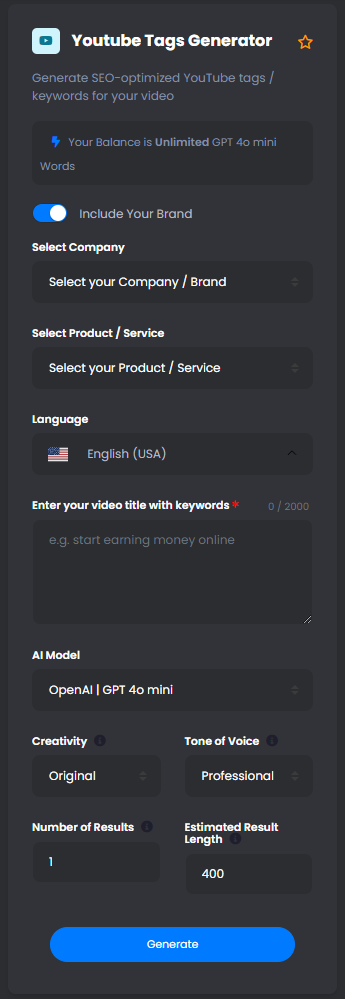
How to Write AI YouTube Tags Using Empror
Access Empror:
- Log in to your Empror account or create one if you don’t have it yet.
Identify the Content Generation Feature:
- Find the AI content generation tool within Empror that specializes in generating keywords or tags for video content.
Craft Your Prompt:
- Provide context for the video by describing its content, themes, and target audience. Include key elements like the video title or a brief description.
Example Prompts:
- “Generate relevant tags for a YouTube video titled ’10 Easy Vegan Recipes for Busy Weeknights.'”
- “Create tags for a travel vlog showcasing the best tourist attractions in Tokyo.”
- “Write tags for a fitness tutorial on how to build core strength for beginners.”
Specify Length and Style:
- Indicate if you prefer a certain number of tags (e.g., 10-15) or specific types of tags (e.g., long-tail, broad keywords, or niche-specific).
Generate the YouTube Tags:
- Submit your prompt to Empror, allowing the AI to generate a list of relevant tags based on your provided information.
Review and Edit:
- Assess the generated tags for relevance and effectiveness. Adjust or add any additional tags that better fit your video’s content and goals.
Implement the Tags:
- Add the selected tags to the YouTube video’s settings before publishing or updating your content.
Benefits of Using an AI YouTube Tags Generator
Time Efficiency:
- Automated generation of tags saves time and effort in brainstorming and researching relevant keywords manually.
Enhanced SEO Capability:
- AI can identify highly relevant and optimized tags that improve the video’s chances of being discovered by the target audience.
Increased Variety:
- An AI tags generator can produce a range of options, allowing content creators to choose from diverse and varied tags for their videos.
Data-Driven Insights:
- AI algorithms can leverage data trends from successful videos to suggest tags that resonate with viewers, improving performance metrics.
Competitive Edge:
- By utilizing data-driven tags, content creators can effectively compete in crowded niches and maximize their content’s reach.
Customizability:
- AI-generated tags can be tailored to fit specific content styles, ensuring that they align with the creator’s branding and messaging strategy.
Improved Engagement:
- Using the right tags can lead to increased viewer engagement, watch time, and ultimately better performance metrics on YouTube.
Conclusion
YouTube tags are crucial for enhancing video discoverability, improving SEO, and categorizing content effectively. A YouTube Tags Generator, particularly one powered by AI like Empror, can assist content creators in streamlining the process of selecting relevant tags. This not only saves time and resources but also positions videos for greater visibility and engagement, ultimately contributing to the success of a creator’s channel on the platform.
(FAQs)
Frequently Asked Questions
Discover the magic behind our YouTube Tags Generator! This powerful tool analyzes your video content and suggests highly relevant tags to help boost your video’s visibility. Let’s dive into how it can elevate your channel!
Tags are like breadcrumbs for YouTube’s algorithm! They help categorize your content, making it easier for viewers to find your videos. Curious about how effective tagging can enhance your channel’s reach? Read on!
Absolutely! While our generator provides suggestions, you have the ultimate control. Feel free to tweak or replace tags to better fit your unique content and style.
Yes! Whether you’re creating vlogs, tutorials, or entertainment videos, our generator is designed to cater to diverse niches. Let’s explore how it can amplify any genre of content!
Great question! Regularly updating your tags can keep your content fresh and relevant. We recommend revisiting your tags every few months or whenever you notice changes in trends.
While tags play a crucial role, they’re just one piece of the puzzle. Quality content, engaging thumbnails, and clever titles also matter! Let’s discuss how to create a holistic approach for maximum impact.
Using targeted, relevant tags is key! Our YouTube Tags Generator focuses on trending keywords and popular searches to help you rank better. Ready to learn more about optimizing your videos?
Definitely! Our generator is perfect for beginners looking to establish their presence on YouTube. Let’s unpack how you can kickstart your journey with the right tagging strategy!
Yes, YouTube has a maximum character limit for tags, but our generator keeps this in mind and curates suggestions that fit within that limit. Curious about maximizing your tagging potential?
Tracking your video performance is essential! Use YouTube Analytics to see how tags influence views and engagement. We’ll guide you on interpreting the data to optimize your future videos!